Skip to main content Skip to footer
Menu
Rates illustration banner Rates illustration banner

Paying your rates FAQs

Paying the Regional Council

Yes, you can. we have phased out the old direct debit plans and now offer flexible payments using Payble, our online payment platform. Find out more about flexible payments here.

Regional Council rates are invoiced once a year.   

2025 - 2026 key dates

September - invoices sent out to ratepayers 

30 September - If you have not received your invoice, please complete the online rates query form

20 October - Due date for all invoices except direct debits

31 October - all payments not received will incur a 10% penalty

30 June 2026 - Final due date for direct debit customers

July 2026 - Direct debit payment recalculated for the new rating year


Do I have to pay the full amount at once?

No. If you set up flexible payments in Payble your annual rates are spread over the entire rating year rather than have to pay the full amount by 20 October.   

Please note

If you choose to pay by automatic payment, you will need to self-monitor your rates account and make sure you clear your balance by 20 October to avoid incurring a penalty.

For this reason, we recommend setting up flexible payments with Payble as then your payments are calculated out across the year to 30 June.

No. We treat the security of your confidential information very seriously and taking credit card payments via the telephone does not leave a reliable enough audit trail for tracking the payment. 

Yes, you can pay your rates online using your credit / debit card and through internet banking.

Credit / debit card payment

Debit Card or Credit Card payments (using Mastercard or Visa) can be made at one of our offices or can be paid online. A surcharge may apply. 

Internet Banking 

Pay direct to our bank account by selecting our payee name from your banks pre-loaded list. You may wish to set up regular automatic payments to pay your rates, please know this type of arrangement is not monitored and will incur late payment penalties if not paid by the due date. Pay your rates using Payble to avoid this. 

Payee name: Bay of Plenty Regional Council Rates
Particulars: Surname and Initials 
Code: Property ID 
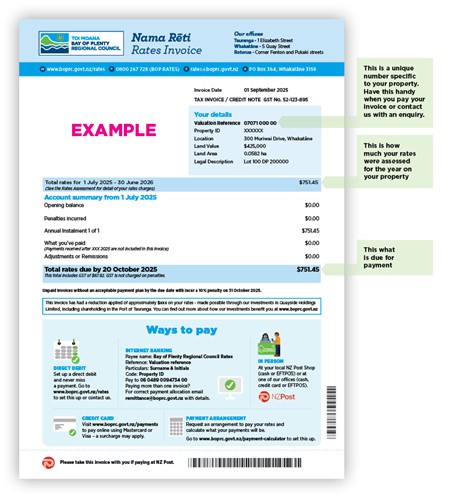
Reference: Valuation Reference (found on the top right-hand corner of your rates invoice) 

You can also manually set up Bay of Plenty Regional Council as a payee using the following details: 
Account number: 06-0489-0094734-00 
Particulars: Surname and Initials 
Code: Property ID 
Reference: Valuation Reference (found on the top right-hand corner of your rates invoice) 

For overseas payments, you will need to use a SWIFT code:
Swift code: ANZBNZ22 
Bank & Branch: ANZ Whakatāne Branch
Account number: 06-0489-0094734-00 
Particulars: Surname and Initials 
Code: Property ID 
Reference: Valuation Reference (found on the top right-hand corner of your rates invoice) 

You can pay your rates in person with eftpos or cash at our Regional Council offices located in Whakatāne, Rotorua and Tauranga

You can pay in person at your local NZ Post Store.  Please take a copy of your invoice with you. 

You can view your 2026 - 2026 rates now by accessing the Rating Information Database (RID) online or at one of our offices, in Rotorua, Tauranga or Whakatane.

2025 - 2026 key dates

September - invoices sent out to ratepayers 

30 September - If you have not received your invoice, please complete the online rates query form

20 October - Due date for all invoices except direct debits

31 October - all payments not received will incur a 10% penalty

30 June 2026 - Final due date for direct debit customers

July 2026 - Direct debit payment recalculated for the new rating year

You can find the details of the last two years rates on the property search function on our website here.

Below the rates details for this current year is the Regional Council rates that you paid last year directly and also the Regional Council rates that you have previously been charged through your local district or city council. 

When we decided to set up rates collection based on a single instalment each year, we took several things into consideration:

  • To minimise administration costs, so that rates can be kept as low as possible, and
  • To align with the standard practice of other regional councils across the country.

Unlike city and district councils who tend to have either two or four instalments a year, most regional councils around the country only have one. This is because the annual rates amount charged by regional councils is typically much lower than city or district council rates, and a single instalment is likely to be more affordable to pay.

Secondly, there is a need to keep administration costs as low as possible. Because we have over 145,000 rating units across the region, the costs to send out an instalment invoice and provide the associated resourcing to support customers with enquiries and payments rise significantly. 

If a lump sum payment is not affordable for you, we recommend setting up a flexible payment plan using out online payment platform Payble, to smooth your payments across the year, without incurring penalties. Find out more about flexible payments here.

Our online rates payment platform Payble, allows you to view your account balance.

Simply log in using your phone or computer and view your account information.

No. An early payment discount disadvantages customers who cannot afford to pay their annual rates in a lump sum, and the benefits received from those who take up an early payment discount is paid for by all other ratepayers, so an early payment discount is not considered to be a fair system. 

You will need to request a refund of the payment from the city or district council. You can find their contact details here.  

Yes, if you set up a flexible payment plan or autopay option using our online payment platform Payble, you will receive notifications to your phone or email letting you know when you’re your rates payment is due. Sign up to use Payble here.

For any credit on your rates account that you may have with your local council, you will need to contact them directly to arrange a refund. Most councils will not transfer payments. 

Your invoice explained

Your invoice has the detail about what rates you are required to pay, when those rates are due and how you can pay them.

We will start sending invoices in September. Depending on where you live, you might not receive yours straight away, as we will be sending them to the different city and district council areas over the month.

2025 - 2026 key dates

September - invoices sent out to ratepayers 

30 September - If you have not received your invoice, please complete the online rates query form

20 October - Due date for all invoices except direct debits

31 October - all payments not received will incur a 10% penalty

30 June 2026 - Final due date for direct debit customers

July 2026 - Direct debit payment recalculated for the new rating year

Bay of Plenty Regional Council will send out one instalment each year.

This means we’ll send one invoice to you, in September each year. This invoice cycle will be different to your city or district council.

2025 - 2026 key dates

September - invoices sent out to ratepayers 

30 September - If you have not received your invoice, please complete the online rates query form

20 October - Due date for all invoices except direct debits

31 October - all payments not received will incur a 10% penalty

30 June 2026 - Final due date for direct debit customers

July 2026 - Direct debit payment recalculated for the new rating year

Yes, you can. You can help us reduce the impacts of climate change by signing up to receive your invoice by email here.

As part of the sign up process you can simply check a box to let your city or district council know to email their rates invoice to you as well. 

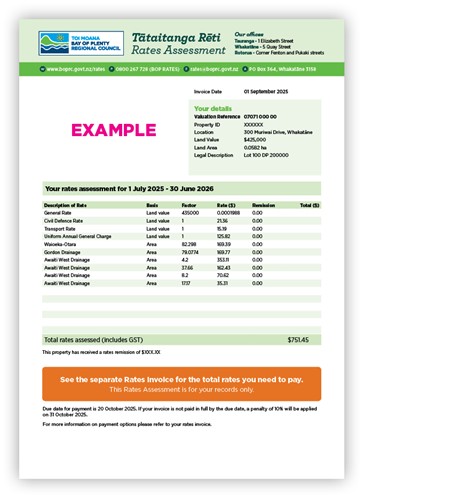
When you receive your rates invoice (either by post or by email), you’ll receive two key documents – your Rates Invoice and your Rates Assessment

Your Rates Invoice sets out how much you are required to pay and the different ways you can pay this.

Rates invoice

Your Rates Assessment breaks down how your rates have been calculated and the different rates you are required to pay – such as general rates, targeted rates and annual charges.

The best way to request a copy of your statement or invoice is to request one using the rates online query form. 

If you need an additional copy of your invoice you can complete the same form. 

Legally we must address rates invoices to the ratepayer - that’s the person who is listed on the district valuation roll for the property and is legally liable to pay the property’s rates. In most cases this is the property owner, in limited circumstances it might be the lessee of the property if the lease is registered under the Land Transfer Act 2017.

You can, however, request that your rates invoice is sent ‘care of’ another person such as a property manager, accountant, or tenant. We strongly discourage this as the ratepayer is ultimately responsible for the payment of the invoice and this increases the chances of a payment being missed.

You can choose to receive your invoice by email or post - not both. If your preference is email we can email up to two email addresses. 

Please note, if you change your mailing address to a ‘care of’ address, then all correspondence from council regarding rates for that property will go to that address.

If your properties are on separate titles, under the Local Government (Rating) Act, we must send you separate invoices.

However, if you have two or more rating units that are owned by exactly the same owner(s), are contiguous (share a boundary) and are used jointly as a single unit, you may quality for contiguous rating. This means that the Regional Council may be able to treat them as if they are one single rating unit, for rating assessment purposes. This can reduce the Uniform Annual General Charges and some targeted rates, such as the Civil Defence Emergency Management and Passenger Transport targeted rates. You will still however receive two rates invoices.

If this situation applies to you, please apply to the Regional Council by using the relevant forms.

Please note that there are different rules for farming, please contact us for more information.

Legally we can’t send a combined invoice.

Rates rebates

A rates rebate is a partial refund on your combined Regional Council and City/District Council rates. Ratepayers are only eligible for one rebate per rating year.

If you meet the criteria, you will be entitled to one rates rebate per rating year for the property you were living in on 1 July – no matter how many properties you own and where those properties are. This means if you have properties in more than one rating area (for example in Tauranga and in Rotorua) you will only be able to apply for one rates rebate.

To calculate your rebate, your City/District Council and Regional Council rates will be added together to calculate your total rates for the current year. If successful, your rebate will be applied as a credit to your City/District Council rates only.

Visit www.govt.nz/housing-and-property and download the forms required to apply for a rates rebate. You may also need to supply other information to support your application. You should then return the application to your city or district council (not Regional Council) who will process the application.

If you meet the criteria, you will be entitled to one rates rebate per rating year for the property you were living in on 1 July – no matter how many properties you own and where those properties are. This means if you have properties in more than one rating area (for example in Tauranga and in Rotorua) you will only be able to apply for one rates rebate.

Failing to pay rates

There may be a number of reasons why your payment is not showing against your property. 

For us to attempt to locate this payment, please complete the online rates query form and tick the 'have received a penalty notice'.  Ideally please provide the following information:

  1. How the payment was made
  2. Date the payment was made
  3. Reference used if online
  4. The exact amount paid.

The more information that you can provide, the easier it will be to search for your payment. We will then let you know the outcome of the search. If the payment can be located, the 10% penalty will not apply.

If you have paid us instead of your city or district council you should request a refund from us. The processing time for a refund can be up to ten working days so we suggest that you contact your local council in the interim to explain the situation in order to avoid any late payment penalties. The refund will be paid back to you, not to your local council. 

If you have paid your district or city council instead of us you will need to contact them to arrange a refund. You will need to let us know how and when the payment will be made to us, so we can remove the 10% penalty once payment has been received.

If you don’t pay your rates by the due date, a 10% penalty may be added to your outstanding rates balance.  To avoid incurring a rates penalty, set up a flexible payment plan using Payble, our online payment platform. Flexible plans allow you to spread your rates to 30 June.

If you are struggling to pay your rates, and a flexible payment plan doesn’t suit you needs, let us know by completing the alternative payment arrangement form and we will do our best to help you.

A 10% penalty rate will be added to any rates amounts not paid by 20 October unless payment is being made by direct debit. 

An additional 10% arrears penalty will be added to any arrears that remain unpaid by July and January each year. 

If you have an opening rates account balance of zero ($0.00), you may still have Regional Council rates that remain unpaid for previous financial years.

Any unpaid Regional Council rates may be included in the opening balance of your city or district council and be collected by them on our behalf. 

Penalties apply to any rates still owing after the due date (20 October) which for the current rating year (1 July - 30 June) this is 31 October.

The exception to this is if you have set up flexible payments through Payble.

If you have incurred a 10% penalty on your outstanding rates invoice, a penalty notice will be sent out to you.

If you are unable to pay your rates by the due date, we recommend setting up a flexible payment plan using Payble, our online payment platform.  Flexible payment plans are automatically suppressed from late payment penalties. Find out more about this here.

You may qualify for a penalty remission through our rating policy.

 If you believe you meet the criteria for a penalty to be remitted, you need to submit a written application by completing the online rates query form and tick 'have received a penalty notice'.

Before requesting the penalty to be removed you must pay the outstanding balance or set up a suitable payment arrangement using Payble, out online payment platform.

Disputing your rates

You’ll need to contact us if you’d like to dispute your rates amount.

You can contact us using the form on our website, or call us on 0800 BOP RATES (0800 267 728). Please have your valuation number handy.

You can also contact the Ombudsman, an official who investigates complaints from members of the public about the decisions or conduct of government bodies and officials.  You can freephone on 0800 802 602 or email info@ombudsman.parliament.nz. You can also visit the Ombudsman website at www.ombudsman.parliament.nz